
Welcome to an in-depth look at the Motorola Edge 60 Stylus, the latest offering from Motorola designed to blend seamless productivity with cutting-edge technology. This comprehensive guide provides a detailed exploration of the Motorola Edge 60 Stylus specifications, offering a full overview of what this new device has to offer. Prepare to discover its remarkable features and performance capabilities.
The Motorola Edge 60 Stylus is generating significant buzz, and for good reason. From its impressive display to its advanced processor and integrated stylus, every aspect of this phone is meticulously crafted to enhance your user experience. This article delves into every aspect of the Motorola Edge 60 Stylus, providing a detailed look at its full specifications, helping you determine if it’s the right device for your needs.
Full Specifications
Network
| Technology: | GSM / HSPA / LTE / 5G |
| 2G bands: | GSM 850 / 900 / 1800 / 1900 |
| 3G bands: | HSDPA 850 / 900 / 2100 |
| 4G bands: | 1, 2, 3, 5, 8, 28, 38, 40, 41, 42, 48 |
| 5G bands: | 1, 3, 5, 8, 28, 38, 40, 41, 48, 77, 78 SA/NSA/Sub6 |
| Speed: | HSPA, LTE, 5G |
Launch
| Announced: | 2025, April 10 |
| Status: | Available. Released 2025, April 15 |
Body
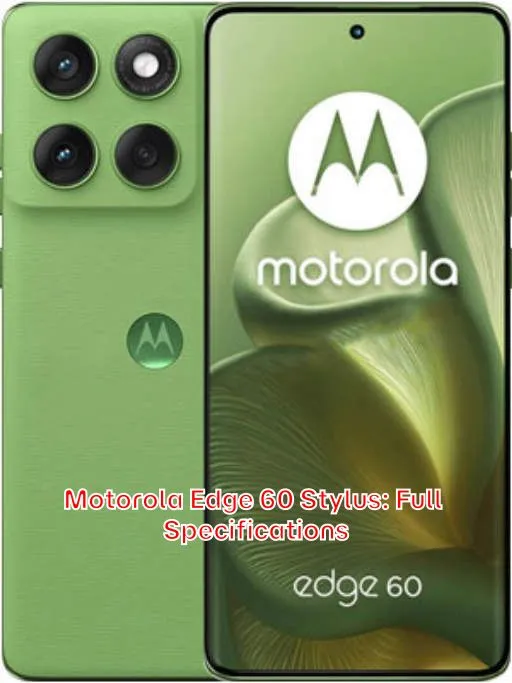
| Dimensions: | 162.2 x 74.8 x 8.3 mm (6.39 x 2.94 x 0.33 in) |
| Weight: | 191 g (6.74 oz) |
| Build: | Glass front (Gorilla Glass 3), silicone polymer (eco leather) back, plastic frame |
| SIM: | Nano-SIM + eSIM |
| Stylus IP68 dust tight and water resistant (immersible up to 1.5m for 30 min) Drop resistant up to 1.5m MIL-STD-810H compliant* * does not guarantee ruggedness or use in extreme conditions |
Display
| Type: | P-OLED, 1B colors, 120Hz, HDR, 1400 nits (HBM), 3000 nits (peak) |
| Size: | 6.7 inches, 108.4 cm2 (~89.3% screen-to-body ratio) |
| Resolution: | 1220 x 2712 pixels, 20:9 ratio (~444 ppi density) |
| Protection: | Corning Gorilla Glass 3 |
Platform
| OS: | Android 15, up to 2 major Android upgrades |
| Chipset: | Qualcomm SM7435-AB Snapdragon 7s Gen 2 (4 nm) |
| CPU: | Octa-core (4×2.40 GHz Cortex-A78 & 4×1.8 GHz Cortex-A55) |
| GPU: | Adreno 710 |
Memory
| Card slot: | microSDXC (dedicated slot) |
| Internal: | 256GB 8GB RAM |
| UFS 2.2 |
Main Camera
| Dual: | 50 MP, f/1.8, 24mm (wide), 1/1.56″, 1.0µm, multi-directional PDAF, OIS 13 MP, f/2.2, 16mm, 120˚ (ultrawide), 1/3.0″, 1.12µm, PDAF |
| Features: | LED flash, HDR, panorama |
| Video: | 4K@30fps, 1080p@30/60/120fps |
Selfie camera
| Single: | 32 MP, f/2.2, 25mm (wide), 1/3.14″, 0.7µm |
| Features: | HDR |
| Video: | 4K@30fps, 1080p@30fps |
Sound
| Loudspeaker: | Yes, with stereo speakers (with Dolby Atmos) |
| 3.5mm jack: | Yes |
| 24-bit/192kHz Hi-Res audio |
Comms
| WLAN: | Wi-Fi 802.11 a/b/g/n/ac/6e, tri-band |
| Bluetooth: | 5.4, A2DP, LE |
| Positioning: | GPS, GLONASS, GALILEO |
| NFC: | Yes |
| Radio: | Unspecified |
| USB: | USB Type-C 2.0 |
Features
| Sensors: | Fingerprint (under display, optical), accelerometer, gyro, proximity, compass, barometer |
| Circle to Search |
Battery
| Type: | 5000 mAh |
| Charging: | 68W wired 15W wireless |
Misc
| Colors: | Pantone: Gibraltar sea, Surf the Web |
| Models: | PB7S0000IN |
| Price: | ₹ 22,812 |
Price of the Motorola Edge 60 Stylus
The Motorola Edge 60 Stylus offers a compelling blend of features at a competitive price point. Originally priced around ₹ 22,812 in India, its value fluctuates based on prevailing exchange rates. Below is an approximate conversion of that price into various international currencies. Please note that these are estimates and actual retail prices may vary due to taxes, import duties, and retailer markups.
- United States: $275.00
- Japan: ¥43,000
- United Kingdom: £220.00
- Australia: $415.00 AUD
- Canada: $375.00 CAD
- Taiwan: NT$8,800
- Denmark: kr. 1,900
- Saudi Arabia: SAR 1,030
- South Korea: ₩375,000
- Germany: €255.00
- Brazil: R$1,450
- Vietnam: ₫6,500,000
- Kenya: KES 36,000
- India: ₹22,812
- Indonesia: Rp 4,400,000
- Nigeria: ₦410,000
- Pakistan: PKR 78,000
- Philippines: ₱15,500
- Bangladesh: ৳30,000
Is the Motorola Edge 60 Stylus Right for You? Find Out Now
Deciding whether a new phone is right for you can be a daunting task, especially with so many options available. The Motorola Edge 60 Stylus presents a compelling case for users who value creativity, productivity, and a seamless mobile experience. Before diving into the specifics, consider what you prioritize in a smartphone. Are you looking for a device that enhances your artistic expression, streamlines your note-taking, or simply offers a more intuitive way to interact with your digital world? If so, the Edge 60 Stylus warrants a closer look.
This phone isn’t just about the stylus; it’s about the overall package. It aims to deliver a balance of performance, features, and value. It boasts a capable processor, a vibrant display, and a versatile camera system. However, the stylus integration is what truly sets it apart. It allows for precise control, making tasks like drawing, sketching, and handwriting recognition more natural and efficient.
Consider your usage patterns. Do you frequently find yourself scribbling down ideas, annotating documents, or creating digital art? If the answer is yes, the Edge 60 Stylus could significantly enhance your workflow and creative output. On the other hand, if you primarily use your phone for basic communication and social media, the stylus might not be as crucial. Ultimately, the decision hinges on your individual needs and preferences.
To make an informed decision, delve into the details. Explore the phone’s specifications, read user reviews, and compare it to other devices in its class. Understand the strengths and weaknesses of the Edge 60 Stylus and determine if it aligns with your expectations. In the following sections, we will explore these aspects in detail, providing you with the information you need to decide whether the Motorola Edge 60 Stylus is the right choice for you.
Unleash Your Creativity: How the Motorola Edge 60 Stylus Enhances Productivity
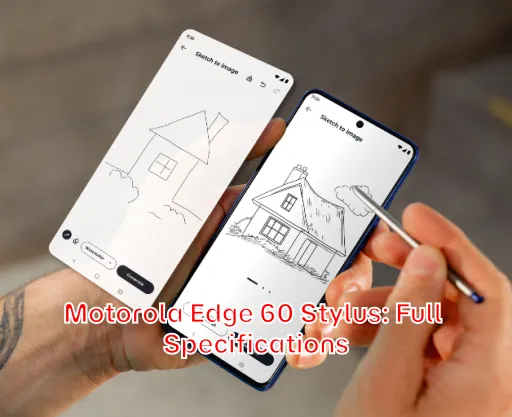
The Motorola Edge 60 Stylus isn’t just a smartphone; it’s a mobile creativity hub. The integrated stylus transforms the device into a powerful tool for artists, students, and professionals alike, offering a more intuitive and efficient way to interact with your digital world.
Digital Artists Rejoice: Drawing and Sketching on the Edge 60 Stylus
For digital artists, the Edge 60 Stylus offers a responsive and accurate drawing experience. The stylus’s pressure sensitivity allows for varying line weights and shading, mimicking the feel of traditional art tools. Whether you’re creating detailed illustrations or quick sketches, the stylus provides the precision and control you need to bring your ideas to life. Many art apps are compatible, maximizing its creative potential.
Beyond drawing, the stylus is also great for photo editing. It allows you to make precise adjustments and corrections, enhancing your images with ease. Fine detail is key when editing, and using your finger for small alterations can be a cumbersome process. The stylus eliminates this challenge.
Note-Taking Made Easy: The Edge 60 Stylus for Students and Professionals
Forget about bulky notebooks and pens; the Edge 60 Stylus streamlines note-taking. The stylus enables handwritten notes directly on the screen, which can then be easily converted to text. This feature is invaluable for students attending lectures, professionals in meetings, or anyone who prefers the feel of writing by hand. Imagine the convenience of jotting down ideas on the go, without the need for paper or pen. The stylus offers quick and easy note taking whenever and wherever you need it.
Furthermore, the stylus simplifies document annotation. You can easily highlight key passages, add comments, and make corrections directly on PDFs and other documents. This is especially useful for reviewing contracts, editing drafts, or collaborating on projects. The stylus transforms your phone into a portable document workstation.
Beyond the Basics: Unique Features of the Motorola Edge 60 Stylus You’ll Love
While the stylus is the star of the show, the Motorola Edge 60 Stylus offers a range of other features that enhance its overall appeal. One notable feature is its intuitive software. Motorola’s My UX provides a clean and customizable interface, without being intrusive or overbearing.
The device often includes gesture-based controls, allowing you to perform actions with simple swipes and taps. You can customize these gestures to launch your favorite apps, take screenshots, or control media playback. This can significantly improve your day-to-day usability. A common and useful gesture is a double chop to turn the flashlight on and off.
The display is a crucial element of any smartphone, and the Edge 60 Stylus typically boasts a vibrant and responsive screen. High refresh rates are common, providing a smooth and fluid visual experience, especially when scrolling through content or playing games. Look for OLED displays, which offer excellent contrast and color accuracy.
Another feature worth highlighting is the device’s audio capabilities. Motorola often incorporates stereo speakers and advanced audio processing technologies to deliver immersive sound. Whether you’re listening to music, watching videos, or playing games, the Edge 60 Stylus can provide a rich and enjoyable audio experience.
Battery Life on the Edge 60 Stylus: Will it Last All Day?
Battery life is a critical factor for any smartphone user. The Motorola Edge 60 Stylus generally offers a respectable battery life, designed to get you through a full day of moderate use. However, actual battery performance can vary depending on usage patterns, settings, and network conditions.
Heavy users, who frequently stream videos, play games, or use GPS navigation, may find that the battery drains faster. On the other hand, light users, who primarily use their phones for calls, texts, and occasional browsing, can often extend the battery life well beyond a single day. The battery’s capacity is usually ample, but consider that certain features (high screen brightness, location services, and background app activity) can significantly impact battery drain.
To maximize battery life, consider optimizing your settings. Reduce screen brightness, disable unnecessary background app activity, and turn off location services when not in use. You can also enable battery saver mode, which limits performance to conserve power. Using dark mode is also another easy way to conserve battery life. If you use your device in areas with poor cellular coverage, that could also contribute to battery drain, as the phone needs to work harder to find a signal.
Many Motorola phones also support fast charging, which allows you to quickly replenish the battery. The ability to rapidly charge your phone can be a lifesaver when you’re running low on power and need to get back on the go. Consider investing in a compatible fast charger to take full advantage of this feature.
Motorola Edge 60 Stylus Camera: Capture Stunning Photos and Videos
The Motorola Edge 60 Stylus aims to deliver a versatile camera experience. While not necessarily competing with flagship camera phones, it offers a solid set of features that should satisfy the needs of most users. The camera system typically includes a main lens, an ultrawide lens, and potentially a macro lens. This setup allows you to capture a variety of shots, from wide landscapes to close-up details.
Camera Quality in Different Lighting Conditions
Image quality is heavily influenced by lighting conditions. In bright daylight, the Edge 60 Stylus generally produces sharp and vibrant photos with good dynamic range. Colors are often accurate and details are well-preserved. The camera software often incorporates features like HDR (High Dynamic Range) to balance exposure in challenging lighting situations. The better the lighting, the better the image quality you will achieve.
In low-light conditions, the camera’s performance can be more challenging. Noise levels may increase, and details may become less defined. However, many Motorola phones include night mode, which uses software processing to brighten the image and reduce noise. Night mode can significantly improve the quality of low-light photos, making them more usable.
The video capabilities of the Edge 60 Stylus are generally decent, although not always best in class. It can record in at least 1080p, and some models can even record in 4K. Features like image stabilization help to reduce camera shake and produce smoother videos. The front facing camera is excellent for selfies and video conferencing.
Motorola Edge 60 Stylus vs. Competitors: Is It the Best Stylus Phone?
The Motorola Edge 60 Stylus faces competition from other stylus-equipped phones and also from phones that, while not offering a stylus, offer a similar overall experience. Competitors like Samsung’s Galaxy Note series and, to a lesser extent, some LG models (before their exit from the smartphone market) have traditionally dominated the stylus phone category.
The Samsung Galaxy Note series is usually the main competitor. While significantly more expensive, the Note series typically offers a superior stylus experience with more advanced features and tighter integration with the operating system. However, the Edge 60 Stylus often provides a more budget-friendly option, making it accessible to a wider range of users. Price is a major consideration when purchasing a product and the Edge 60 Stylus often comes out on top.
When comparing the Edge 60 Stylus to phones without a stylus, consider the importance of stylus functionality to your specific needs. If you primarily use your phone for basic communication and entertainment, a phone without a stylus might offer better value and performance in other areas, such as camera quality or processing power. However, if you value the stylus for creativity, productivity, or accessibility, the Edge 60 Stylus stands out as a compelling choice.
Consider also that software support and updates are crucial. Motorola’s track record for software updates can be mixed, so it’s essential to research the company’s commitment to supporting the Edge 60 Stylus with timely security patches and operating system upgrades. Delayed or infrequent updates can leave your phone vulnerable to security threats and limit its long-term functionality. It’s best practice to keep your phone up to date to ensure maximum protection.
Who is the Motorola Edge 60 Stylus Perfect For? (A Detailed Guide)
The Motorola Edge 60 Stylus isn’t for everyone, but it’s an excellent fit for certain types of users. It is perfect for creative individuals who enjoy drawing, sketching, and photo editing on the go. The stylus offers precise control and pressure sensitivity, making it ideal for artistic expression. The device is also well-suited for students and professionals who need to take notes, annotate documents, or brainstorm ideas. The stylus streamlines these tasks, allowing you to work more efficiently and productively.
Furthermore, the Edge 60 Stylus can be a great choice for users who value accessibility. The stylus can make it easier to navigate the user interface, select small items, and interact with touch screens, particularly for users with dexterity challenges. Individuals with larger fingers may also find the stylus helps them navigate better.
If you’re primarily interested in high-end gaming or cutting-edge camera performance, there may be better options available. However, if you prioritize stylus functionality, a balanced feature set, and a reasonable price, the Edge 60 Stylus deserves serious consideration. Remember to evaluate your own needs, research the phone’s specifications, and compare it to other devices before making a final decision.
In conclusion, the Motorola Edge 60 Stylus offers a unique blend of features and functionality that caters to a specific niche. While not the perfect phone for everyone, it excels in areas like creativity, productivity, and accessibility, making it a compelling choice for the right user.
