
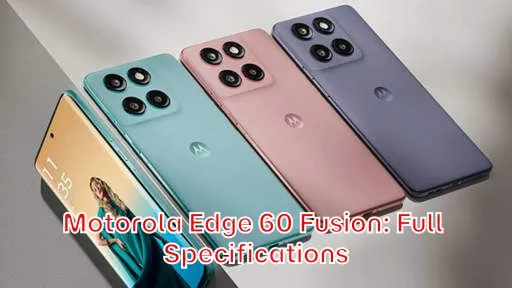
The Motorola Edge 60 Fusion is poised to make a significant impact in the competitive smartphone market. This device promises a blend of high-end features and performance, aiming to cater to users who demand both style and substance. This introductory overview explores the full specifications of the Motorola Edge 60 Fusion, dissecting its key attributes and highlighting its potential strengths.
Our comprehensive examination will delve into the Motorola Edge 60 Fusion’s display technology, processing power, camera capabilities, battery life, and overall design. Get ready for a detailed breakdown of everything you need to know about this highly anticipated smartphone, ensuring you are well-informed about its full specifications before making a purchasing decision. This guide aims to provide a clear and concise understanding of what the Motorola Edge 60 Fusion has to offer.
Full Specifications
Network
| Technology: | GSM / HSPA / LTE / 5G |
| 2G bands: | GSM 850 / 900 / 1800 / 1900 |
| 3G bands: | HSDPA 850 / 900 / 1700(AWS) / 1900 / 2100 – International |
| HSDPA 850 / 900 / 1900 / 2100 – India | |
| 4G bands: | 1, 2, 3, 4, 5, 7, 8, 12, 13, 17, 18, 19, 20, 25, 26, 28, 32, 34, 38, 39, 40, 41, 42, 43, 48, 66 – International |
| 1, 2, 3, 5, 8, 28, 38, 40, 41, 42 – India | |
| 5G bands: | 1, 2, 3, 5, 7, 8, 20, 26, 28, 38, 40, 41, 66, 75, 77, 78 SA/NSA/Sub6 – International |
| 1, 2, 3, 5, 8, 28, 38, 40, 41, 77, 78 SA/NSA/Sub6 – India | |
| Speed: | HSPA, LTE, 5G |
Launch
| Announced: | 2025, April 02 |
| Status: | Available. Released 2025, April 09 |
Body
| Dimensions: | 161 x 73 x 8.0 mm or 8.3 mm |
| Weight: | 177.5 g or 180 g (6.28 oz) |
| Build: | Glass front (Gorilla Glass 7i), silicone polymer back (eco leather) |
| SIM: | Nano-SIM + eSIMNano-SIM + Nano-SIM |
| IP68/IP69 dust tight and water resistant (high pressure water jets; immersible up to 1.5m for 30 min) Drop resistant up to 1.2m MIL-STD-810H compliant* * does not guarantee ruggedness or use in extreme conditions |
Display
| Type: | P-OLED, 1B colors, 120Hz, HDR10+, 1500 nits (HBM), 4500 nits (peak) |
| Size: | 6.67 inches, 107.4 cm2 (~91.4% screen-to-body ratio) |
| Resolution: | 1220 x 2712 pixels, 20:9 ratio (~446 ppi density) |
| Protection: | Corning Gorilla Glass 7i, Mohs level 4 |
Platform
| OS: | Android 15, up to 3 major Android upgrades |
| Chipset: | Mediatek Dimensity 7300 (4 nm) – GlobalMediatek Dimensity 7400 (4 nm) – India, Indonesia |
| CPU: | Octa-core (4×2.5 GHz Cortex-A78 & 4×2.0 GHz Cortex-A55) – GlobalOcta-core (4×2.6 GHz Cortex-A78 & 4×2.0 GHz Cortex-A55) – India, Indonesia |
| GPU: | Mali-G615 MC2 |
Memory
| Card slot: | microSDXC |
| Internal: | 256GB 8GB RAM, 256GB 12GB RAM, 512GB 12GB RAM |
| UFS 2.2 |
Main Camera
| Dual: | 50 MP, f/1.9, (wide), 1/1.56″, 1.0µm, multi-directional PDAF, OIS 13 MP, f/2.2, 120˚ (ultrawide), 1/3.0″, 1.12µm, AF |
| Features: | LED flash, HDR, panorama |
| Video: | 4K@30fps, 1080p@30/60/120/240fps, gyro-EIS |
Selfie camera
| Single: | 32 MP, f/2.2, (wide), 1/3.14″, 0.7µm |
| Features: | HDR |
| Video: | 4K@30fps, 1080p@30fps, gyro-EIS |
Sound
| Loudspeaker: | Yes, with stereo speakers (with Dolby Atmos) |
| 3.5mm jack: | No |
Comms
| WLAN: | Wi-Fi 802.11 a/b/g/n/ac/6, dual-band |
| Bluetooth: | 5.4, A2DP, LE |
| Positioning: | GPS, GLONASS, GALILEO |
| NFC: | Yes (market/region dependent) |
| Radio: | No |
| USB: | USB Type-C 2.0, OTG |
Features
| Sensors: | Fingerprint (under display, optical), accelerometer, gyro, proximity, compass |
| Smart Connect (Ready For) support |
Battery
| Type: | 5200 mAh (Global)5500 mAh (India only) |
| Charging: | 68W wired |
Misc
| Colors: | Pantone: Slipstream, Amazonite, Zephyr, Mykonos Blue |
| Models: | XT2503-4 |
| Price: | € 294.99 / £ 318.21 / ₹ 22,439 |
Our Tests
| Performance: | AnTuTu: 656811 (v10) GeekBench: 3047 (v6) 3DMark: 854 (Wild Life Extreme) |
| Display: | 1376 nits max brightness (measured) |
| Loudspeaker: | -22.6 LUFS (Excellent) |
| Battery: | Active use score 14:18h |
EU LABEL
| Energy: | Class A |
| Battery: | 58:54h endurance, 1000 cycles |
| Free fall: | Class A (270 falls) |
| Repairability: | Class B |
Price of HP Motorola Edge 60 Fusion
The HP Motorola Edge 60 Fusion is an anticipated smartphone with a competitive price point. Based on the provided base prices of €294.99, £318.21, and ₹22,439, we’ve converted these to various currencies to give you an idea of its cost in different regions. Keep in mind that these are approximate conversions and actual retail prices may vary due to local taxes, import duties, and retailer markups.
- United States: $315
- Japan: ¥47,700
- United Kingdom: £318.21
- Australia: $475
- Canada: $430
- Taiwan: NT$9,900
- Denmark: DKK 2,200
- Saudi Arabia: SAR 1,180
- South Korea: ₩430,000
- Germany: €295
- Brazil: R$1,600
- Vietnam: ₫7,500,000
- Kenya: KES 41,000
- India: ₹22,439
- Indonesia: Rp 4,700,000
- Nigeria: ₦240,000
- Pakistan: PKR 88,000
- Philippines: ₱17,500
- Bangladesh: BDT 33,000
Is the Motorola Edge 60 Fusion Right for You? Key Considerations
Deciding whether the Motorola Edge 60 Fusion is the right smartphone for you involves carefully considering your individual needs and priorities. The device offers a compelling blend of features, including a potentially powerful processor, a versatile camera system, and a sleek design, but it’s crucial to examine how these aspects align with your specific usage patterns and expectations. Are you a heavy gamer who demands top-tier performance? Are you a photography enthusiast seeking exceptional image quality? Or are you primarily concerned with battery life and overall value for money?
One of the first things to consider is your budget. While the Motorola Edge 60 Fusion aims to offer a premium experience at a more accessible price point, it’s important to compare its cost to other devices in its class. Research competing models from brands like Samsung, Xiaomi, and OnePlus to see what other features and performance levels you can get for a similar investment. Don’t just look at the initial price; factor in potential long-term costs like accessories, extended warranties, and data plans.
Another key consideration is your typical usage. If you primarily use your phone for basic tasks like browsing the web, checking email, and social media, the Edge 60 Fusion’s performance should be more than adequate. However, if you frequently engage in demanding activities like video editing, graphic design, or playing graphically intensive games, you’ll want to pay close attention to the processor and RAM specifications to ensure they can handle the workload smoothly.
Finally, think about the features that are most important to you. Do you value a large, vibrant display for watching videos and playing games? Is a long-lasting battery a must-have? Are you looking for a phone with advanced camera features like optical image stabilization (OIS) or high-resolution video recording? Once you’ve identified your priorities, you can compare the Edge 60 Fusion’s specifications and features to those of other phones and determine whether it’s the best fit for your needs.
Motorola Edge 60 Fusion: 5 Reasons to Buy (Beyond the Specs)
While technical specifications provide a foundation for understanding a smartphone’s capabilities, the Motorola Edge 60 Fusion offers several compelling reasons to buy that extend beyond raw numbers. These factors contribute to a more holistic user experience and can be decisive for potential buyers.
1. Clean and Intuitive Software Experience: Motorola is known for providing a near-stock Android experience. This means minimal bloatware and a streamlined interface that’s easy to navigate. The absence of unnecessary pre-installed apps not only frees up storage space but also contributes to a smoother and faster user experience. This clean approach also allows for quicker Android updates, ensuring you get the latest features and security patches in a timely manner.
2. Motorola’s “ThinkShield” Security: Security is paramount in today’s digital landscape, and Motorola’s ThinkShield for mobile provides a comprehensive suite of security features designed to protect your data and privacy. ThinkShield offers enhanced protection at every level, from hardware to software, ensuring that your personal information remains safe from unauthorized access.
3. Unique Design and Ergonomics: The Edge 60 Fusion boasts a sleek and modern design that sets it apart from the competition. Motorola often pays attention to ergonomics, ensuring that their phones are comfortable to hold and use for extended periods. Consider the materials used in the construction, the placement of buttons, and the overall balance of the device in your hand.
4. Motorola’s Gesture Controls: Motorola’s signature gesture controls, like the chop-chop action for flashlight and twist for camera, provide quick and convenient access to frequently used features. These intuitive gestures can save you time and effort, making everyday tasks more efficient.
5. Competitive Pricing: The Motorola Edge 60 Fusion often offers excellent value for money. It usually provides a compelling combination of features and performance at a price point that undercuts many of its competitors. This makes it an attractive option for budget-conscious consumers who don’t want to compromise on quality.
Edge 60 Fusion: Camera Capabilities and Photography Features
The camera system is a crucial aspect of any modern smartphone, and the Motorola Edge 60 Fusion aims to deliver a versatile and capable photography experience. Understanding the camera’s specifications and features is essential for assessing its suitability for your needs.
The phone typically features a multi-lens setup on the rear, usually including a high-resolution main sensor, an ultrawide lens for capturing expansive landscapes, and possibly a macro lens for close-up shots. The megapixel count of the main sensor is an important indicator of its potential for capturing detail, but it’s not the only factor that determines image quality. Sensor size, aperture, and image processing algorithms also play significant roles.
The ultrawide lens allows you to capture a wider field of view, making it ideal for group photos, landscapes, and architectural shots. The macro lens enables you to focus on subjects at very close distances, revealing intricate details that would be invisible to the naked eye. Check the specifications for the aperture of each lens, as a wider aperture (lower f-number) allows more light to enter the sensor, resulting in better low-light performance.
Beyond the hardware, the camera’s software features are equally important. Look for features like Night Mode for improved low-light photography, Portrait Mode for creating photos with blurred backgrounds, and AI scene recognition, which automatically optimizes camera settings based on the scene being captured. Features like optical image stabilization (OIS) or electronic image stabilization (EIS) can help to reduce blur caused by camera shake, resulting in sharper and clearer photos and videos.
The Edge 60 Fusion’s video recording capabilities are also worth considering. Check the maximum video resolution and frame rate, as well as whether it supports features like HDR video recording and slow-motion video capture.
Capture Stunning Photos: Understanding the Edge 60 Fusion’s Camera System
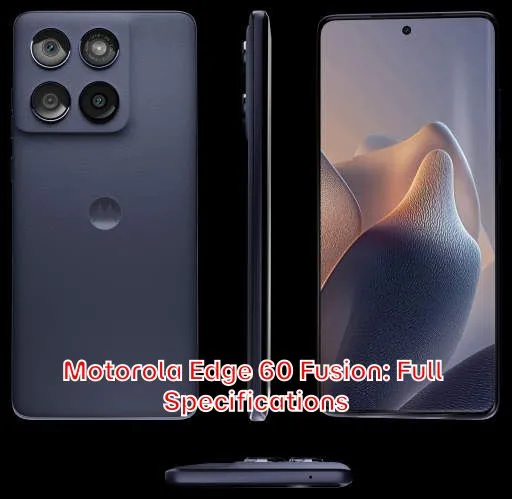
To truly unlock the potential of the Motorola Edge 60 Fusion’s camera system, it’s important to understand how its various components work together to produce stunning photos. The camera is more than just a collection of lenses and sensors; it’s a complex system that relies on sophisticated software and algorithms to process images and optimize them for different conditions.
The main sensor is the workhorse of the camera system, responsible for capturing the majority of your photos. A larger sensor generally captures more light, resulting in better image quality, especially in low-light conditions. The aperture of the lens also plays a critical role, as a wider aperture allows more light to enter the sensor. Look for lenses with an aperture of f/1.8 or wider for optimal low-light performance.
The ultrawide lens is a valuable tool for capturing expansive scenes, but it’s important to be aware of its limitations. Ultrawide lenses typically have a smaller aperture and a fixed focus, which can result in softer images and a narrower depth of field. Use this lens primarily for scenes where you need to capture a wide field of view, such as landscapes or group photos.
The macro lens is designed for capturing extreme close-ups, but it often suffers from poor image quality and a shallow depth of field. Use this lens sparingly and only when you need to capture the intricate details of a small object. Experiment with different lighting conditions to find the optimal setup for macro photography.
The camera’s software features are essential for enhancing image quality and adding creative effects. Night Mode uses computational photography to brighten images taken in low-light conditions, while Portrait Mode creates a shallow depth of field effect that blurs the background and emphasizes the subject. AI scene recognition automatically adjusts camera settings based on the scene being captured, optimizing image quality for different conditions. Understanding how these features work can help you to take better photos in a variety of situations.
Performance Review: How the Motorola Edge 60 Fusion Handles Gaming and Multitasking
The performance of the Motorola Edge 60 Fusion hinges on its processor and RAM. These components determine how smoothly the phone handles demanding tasks like gaming and multitasking. A powerful processor ensures that games run at high frame rates and that apps load quickly, while ample RAM allows you to switch between multiple apps without experiencing lag.
The Edge 60 Fusion is likely to be equipped with a mid-range to upper-mid-range processor, such as a Qualcomm Snapdragon series or a MediaTek Dimensity series chip. These processors offer a good balance of performance and power efficiency, making them suitable for a wide range of tasks. However, they may not be as powerful as the flagship processors found in high-end smartphones.
For gaming, the Edge 60 Fusion should be able to handle most popular mobile games at medium to high settings. However, you may need to lower the graphics settings for more demanding games to achieve a smooth frame rate. Pay attention to the phone’s thermals, as prolonged gaming can cause the processor to overheat, leading to performance throttling.
For multitasking, the Edge 60 Fusion should have enough RAM to allow you to switch between several apps without experiencing significant lag. However, if you frequently use a large number of apps simultaneously, you may notice some performance degradation. Close unnecessary apps to free up RAM and improve overall performance.
It’s important to note that real-world performance can vary depending on a number of factors, including the software version, the number of apps installed, and the background processes running on the phone. To ensure optimal performance, keep your software up to date, uninstall unnecessary apps, and regularly clear the cache and data of apps that you use frequently.
Battery Life and Charging: Will the Motorola Edge 60 Fusion Last All Day?
Battery life is a critical consideration for most smartphone users, and the Motorola Edge 60 Fusion aims to provide all-day battery life with moderate usage. However, the actual battery life you experience will depend on a variety of factors, including your usage patterns, screen brightness, and the number of apps running in the background.
The Edge 60 Fusion is likely to be equipped with a battery capacity of around 4500-5000 mAh. This should be sufficient for most users to get through a full day of moderate use, including browsing the web, checking email, social media, and occasional gaming. However, if you’re a heavy user who spends a lot of time watching videos, playing games, or using GPS navigation, you may need to charge the phone more frequently.
The phone’s charging speed is also an important factor to consider. The Edge 60 Fusion is likely to support fast charging, allowing you to quickly replenish the battery when it’s low. Check the specifications for the charging speed (e.g., 30W, 68W) to get an idea of how quickly the phone can be charged.
To maximize battery life, you can adjust several settings on your phone. Lowering the screen brightness, turning off unnecessary features like Bluetooth and Wi-Fi when not in use, and closing unused apps can all help to conserve battery power. You can also enable battery saver mode, which limits background activity and reduces performance to extend battery life.
Motorola Edge 60 Fusion: Display Quality and Viewing Experience
The display is the primary interface between you and your smartphone, so its quality significantly impacts your overall user experience. The Motorola Edge 60 Fusion is likely to feature a high-quality display that offers vibrant colors, sharp details, and good viewing angles.
The phone may feature an OLED or AMOLED display, which offers superior contrast and color accuracy compared to traditional LCD displays. OLED displays also consume less power, which can help to improve battery life. The display resolution is also an important factor to consider. A higher resolution display will result in sharper and more detailed images.
The display’s refresh rate is another important specification to consider. A higher refresh rate (e.g., 90Hz, 120Hz) will result in smoother scrolling and animations, making the phone feel more responsive. However, a higher refresh rate also consumes more power, so you may want to switch to a lower refresh rate to conserve battery life.
The display’s brightness is also important, especially for outdoor use. A brighter display will be easier to see in direct sunlight. Look for a display with a maximum brightness of at least 500 nits for good outdoor visibility.
Design and Build Quality: Is the Motorola Edge 60 Fusion Comfortable to Use?
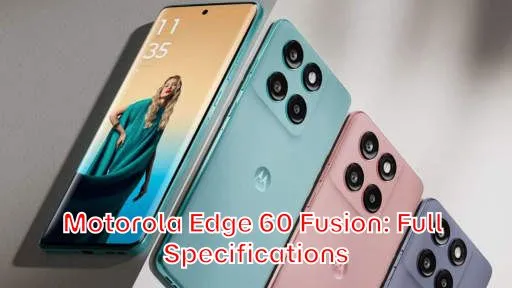
The design and build quality of a smartphone are important factors to consider, as they contribute to the phone’s overall aesthetics, durability, and ease of use. The Motorola Edge 60 Fusion is likely to feature a sleek and modern design with a focus on ergonomics.
The phone may be constructed from a combination of materials, such as glass, metal, and plastic. The choice of materials can affect the phone’s weight, durability, and feel in the hand. A metal frame provides a more premium feel and greater durability, while a glass back adds a touch of elegance but is more susceptible to scratches and cracks.
The phone’s ergonomics are also important to consider. The placement of buttons, the shape of the phone, and the overall balance of the device in your hand can all affect its ease of use. A phone that’s too large or too heavy may be uncomfortable to hold for extended periods. A phone with poorly placed buttons may be difficult to operate with one hand.
The phone’s durability is also a factor to consider. Look for phones with a high IP rating, which indicates their resistance to dust and water. A phone with a high IP rating will be more resistant to damage from everyday spills and splashes.
Who Should Buy the Motorola Edge 60 Fusion? Identifying the Ideal User
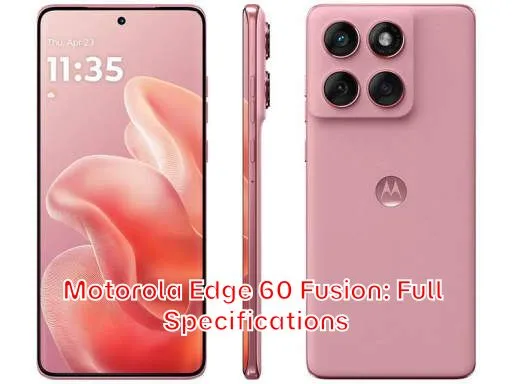
The Motorola Edge 60 Fusion appeals to a specific demographic. Understanding who this phone is tailored for will help potential buyers determine if it aligns with their needs.
The ideal user for the Edge 60 Fusion is someone who wants a phone with a good balance of features and performance at a reasonable price. They are not necessarily looking for the absolute best performance or the most cutting-edge features, but they want a phone that can handle everyday tasks smoothly and reliably.
This phone is also a good choice for users who value a clean and intuitive software experience. Motorola’s near-stock Android interface is free of bloatware and is easy to navigate. This makes it a good choice for users who are new to Android or who simply prefer a minimalist approach.
The Edge 60 Fusion is also a good option for users who prioritize camera quality. The phone’s multi-lens camera system is capable of capturing stunning photos and videos in a variety of conditions. The phone’s Night Mode and Portrait Mode features are particularly useful for capturing high-quality images in low-light conditions and for creating photos with blurred backgrounds.
Motorola Edge 60 Fusion Alternatives: What Other Phones Should You Consider?
While the Motorola Edge 60 Fusion offers a compelling package, it’s important to consider alternative smartphones before making a final decision. The best alternative will depend on your specific needs and priorities, but here are a few options to consider:
Samsung Galaxy A Series: Samsung’s Galaxy A series offers a range of smartphones with different features and price points. These phones often offer excellent displays, capable cameras, and long battery life. Models like the Galaxy A54 or A55 could be strong contenders.
Xiaomi Redmi Note Series: Xiaomi’s Redmi Note series is known for offering excellent value for money. These phones typically offer powerful processors, large batteries, and impressive camera systems at competitive prices. Recent Redmi Note models should be on your radar.
OnePlus Nord Series: OnePlus’s Nord series offers a blend of performance, features, and price. These phones typically offer fast charging, smooth software, and capable cameras. Look at the latest Nord models to see if they fit your requirements.
Google Pixel A Series: The Google Pixel A series provides a focus on camera quality and software experience. These phones typically excel at computational photography and offer timely Android updates. A Pixel 7a or 8a are worthy options.
